The CRM for service businesses, on your own equipment.

Zevli keeps clients, cases, quotes, contracts, payments and messaging on equipment that belongs to you, with your database and your brand. No monthly fees: a perpetual license with the first year of maintenance included.

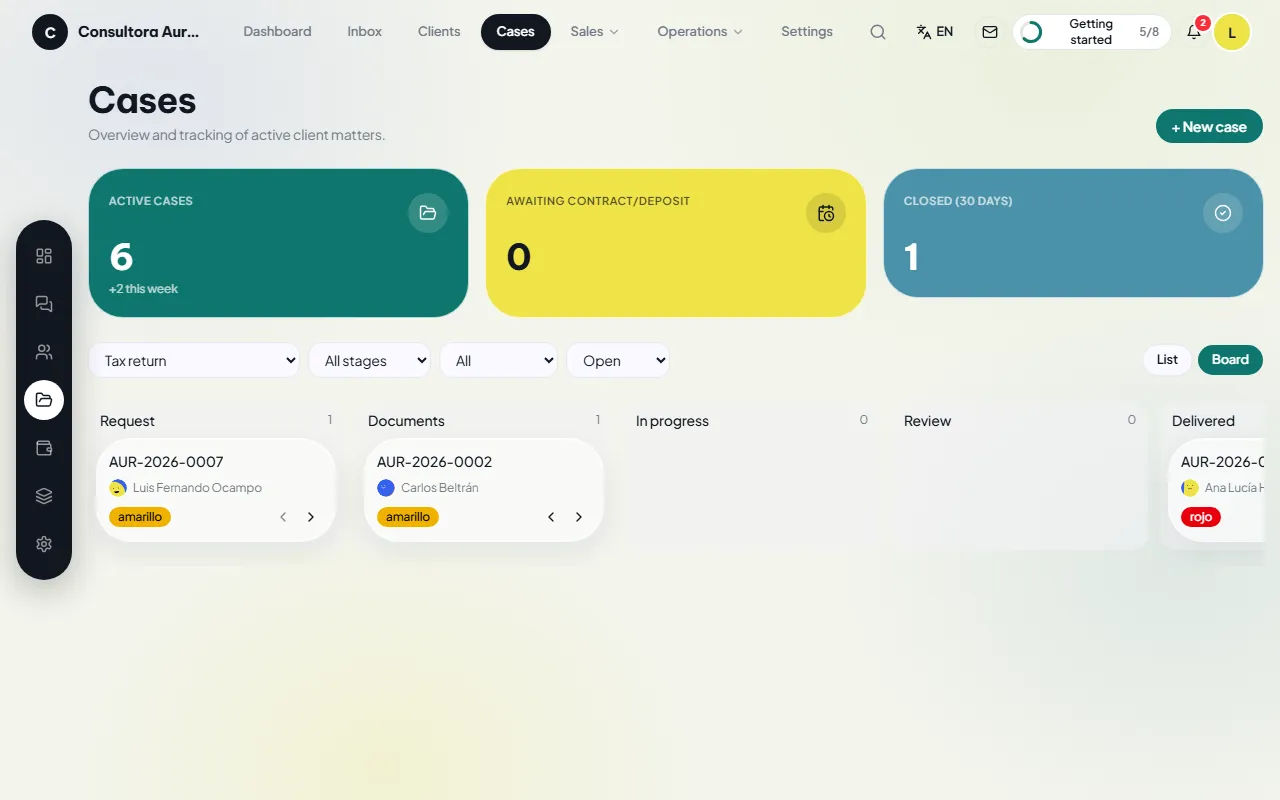
Cases · Board
Case board by stage
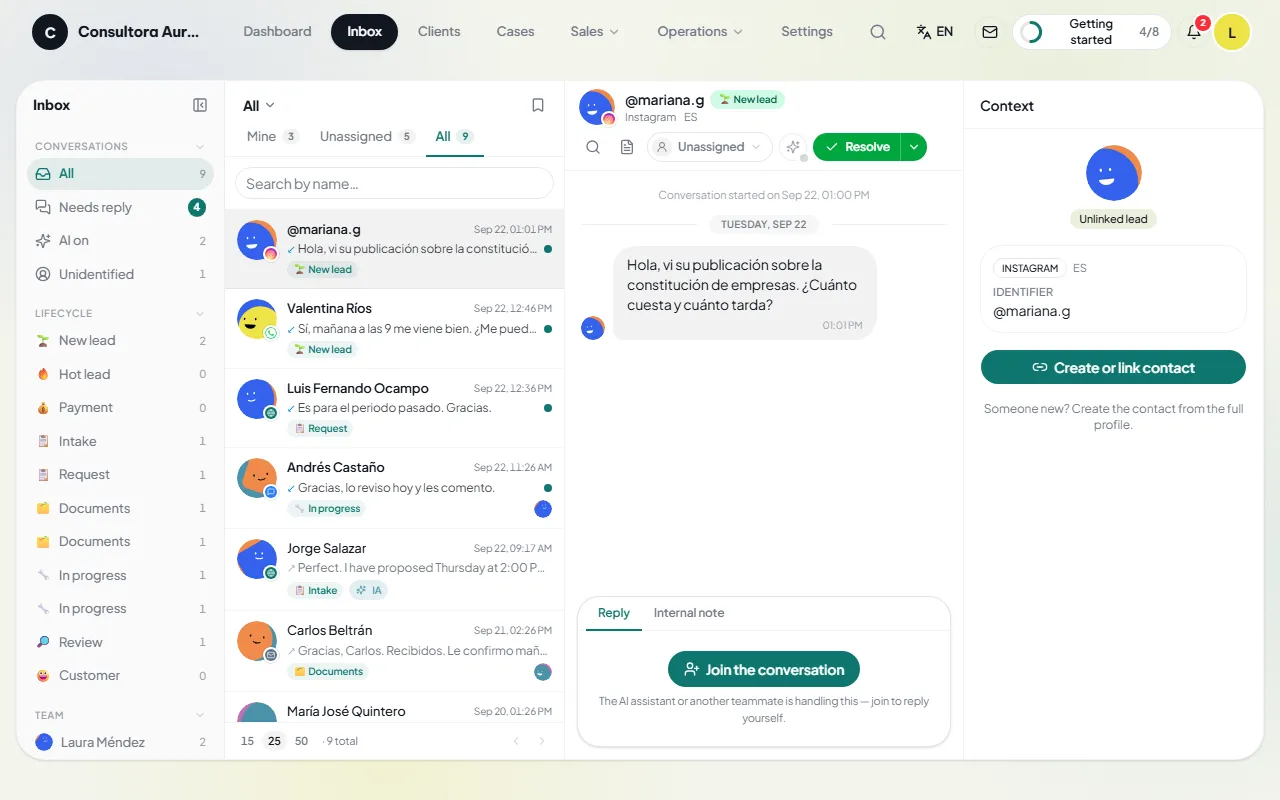
Inbox
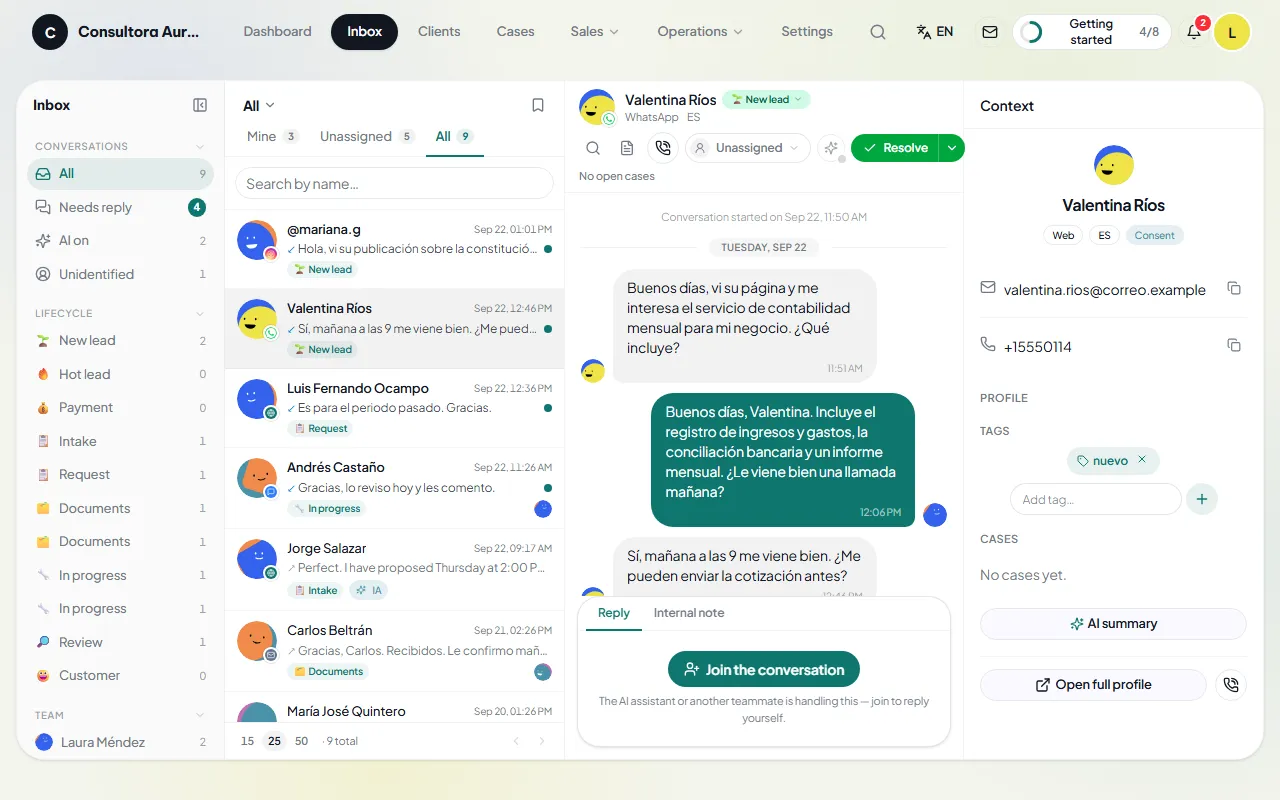
Inbox with conversations from every channel
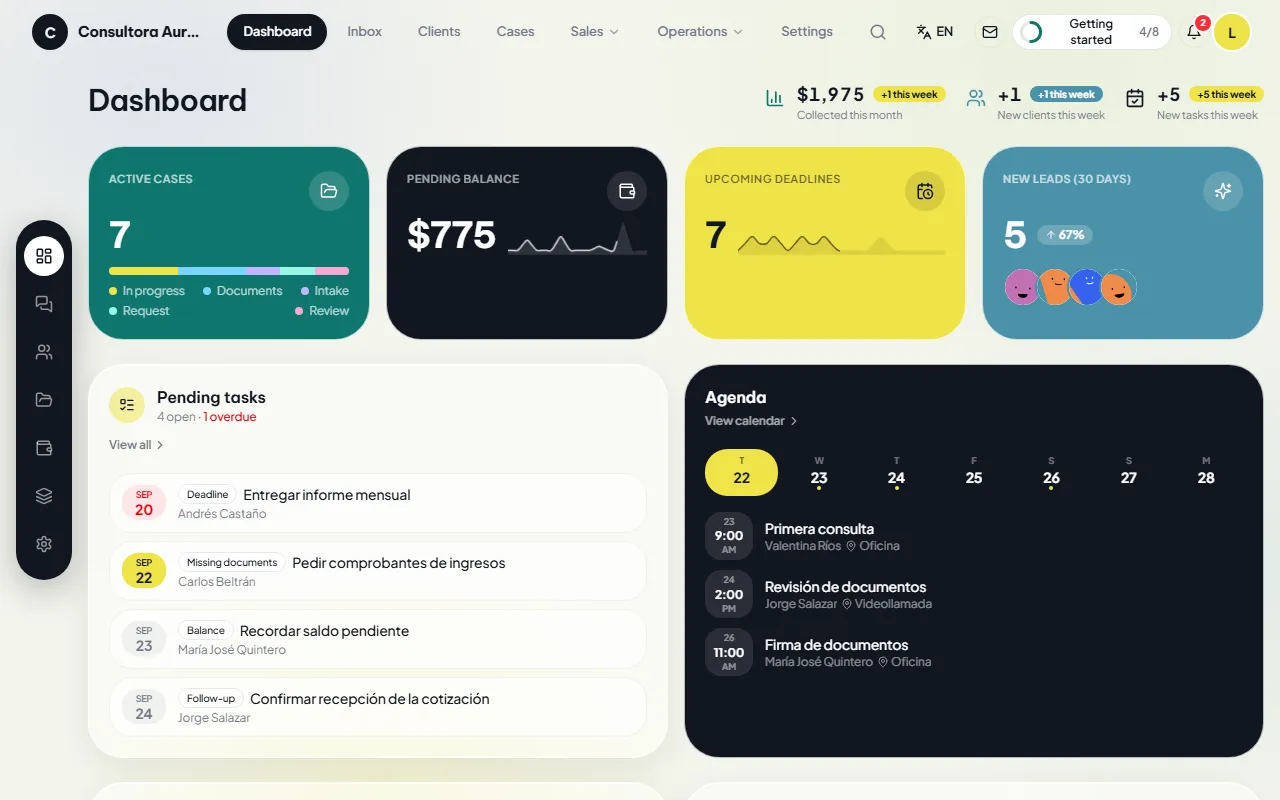
Dashboard · Consultora Aurora
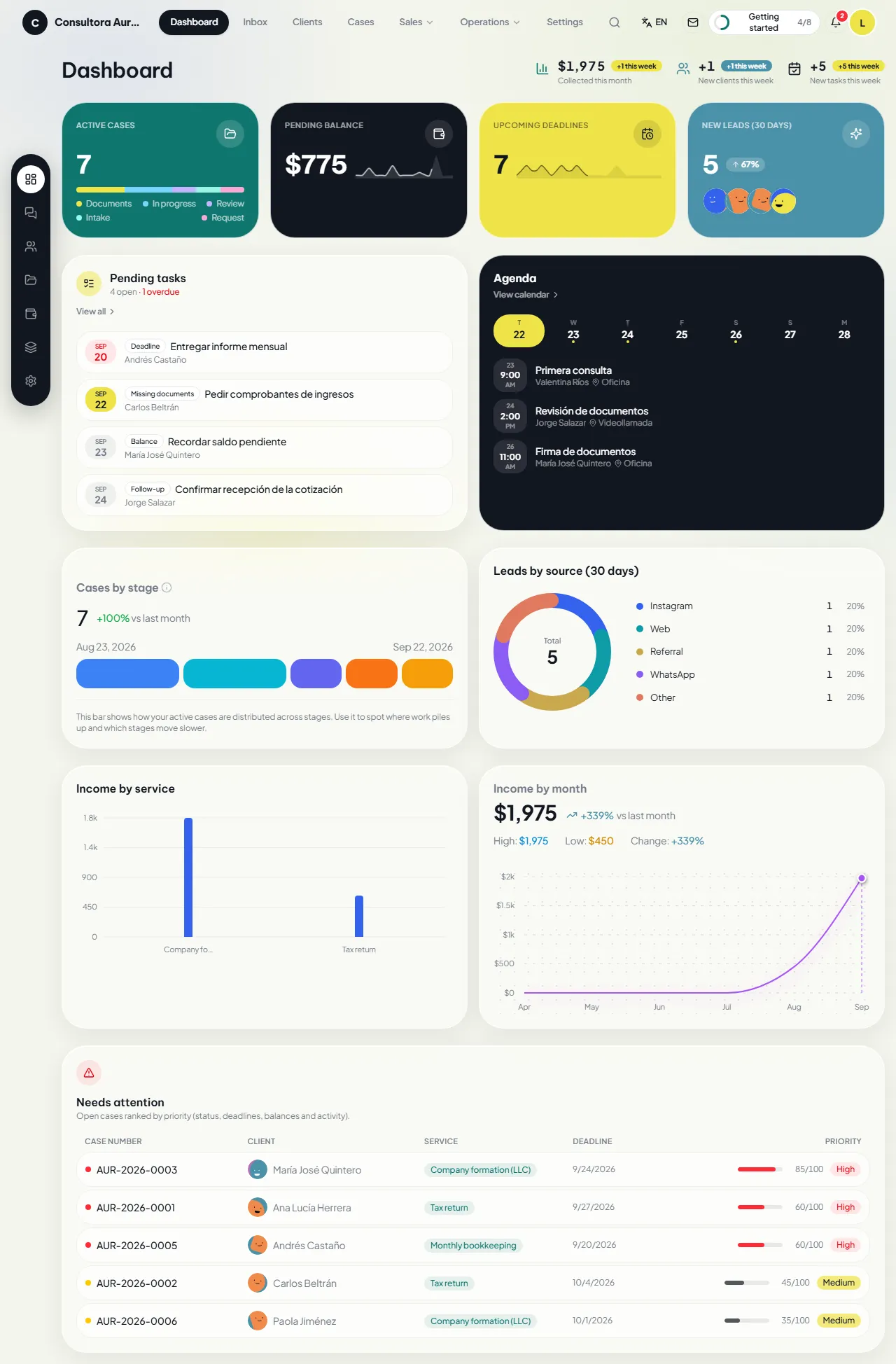
Zevli CRM dashboard with active cases, outstanding balance, upcoming deadlines, leads, tasks and agenda
Phone
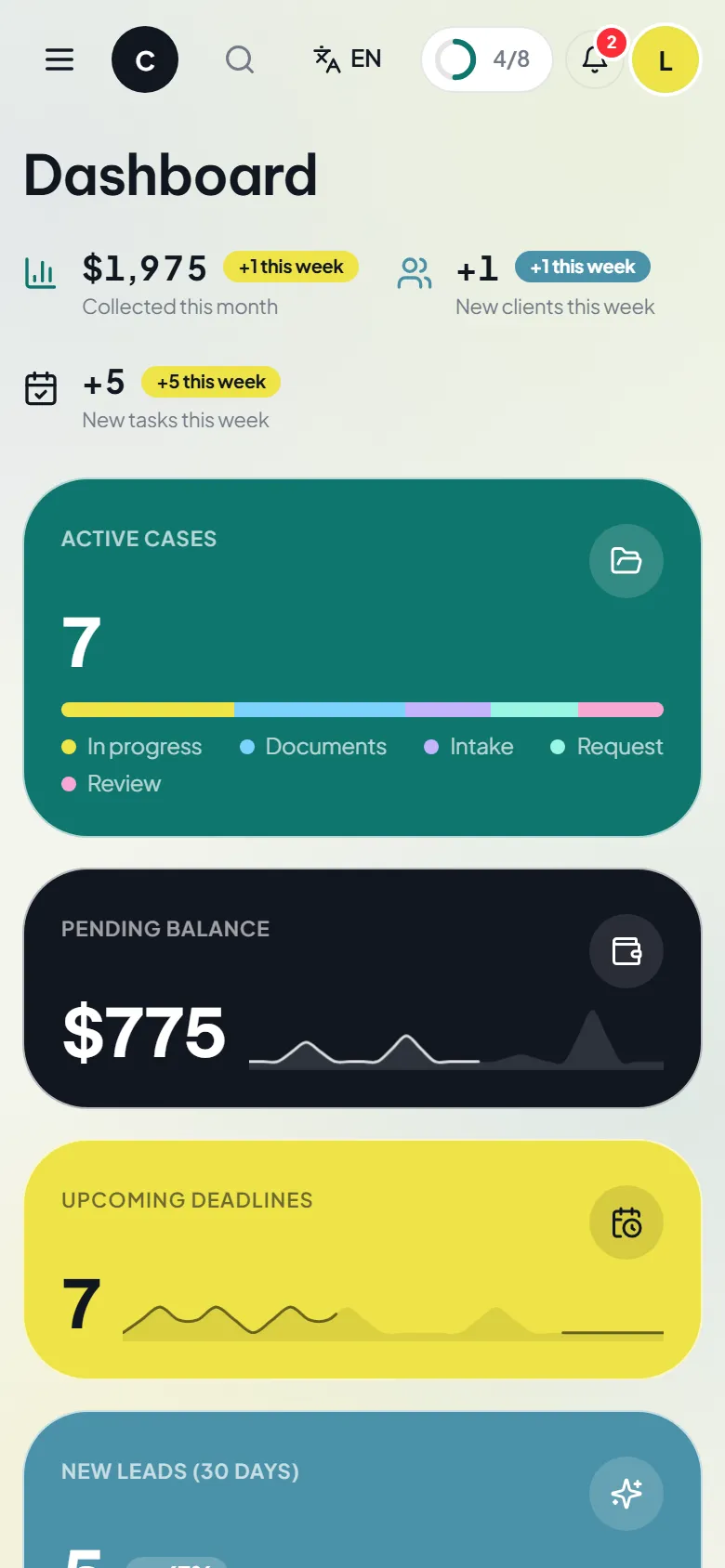
Dashboard on a phone
One-time purchase
Perpetual license. No monthly fees.
Your own equipment
A preinstalled mini PC on your local network.
Your own data
The database lives on your equipment, with no vendor access.
Spanish and English
The whole application and every message to your clients.

The case cycle

Every job is a case: it is opened for a client and quoted, the contract is signed, the deposit is collected, the work is done and the case is closed. The stages, prices and required documents of each service are configured for your industry.

  1. Client
  2. Case
  3. Quote
  4. Contract
  5. Deposit
  6. The lock
  7. Work
  8. Close

The lock

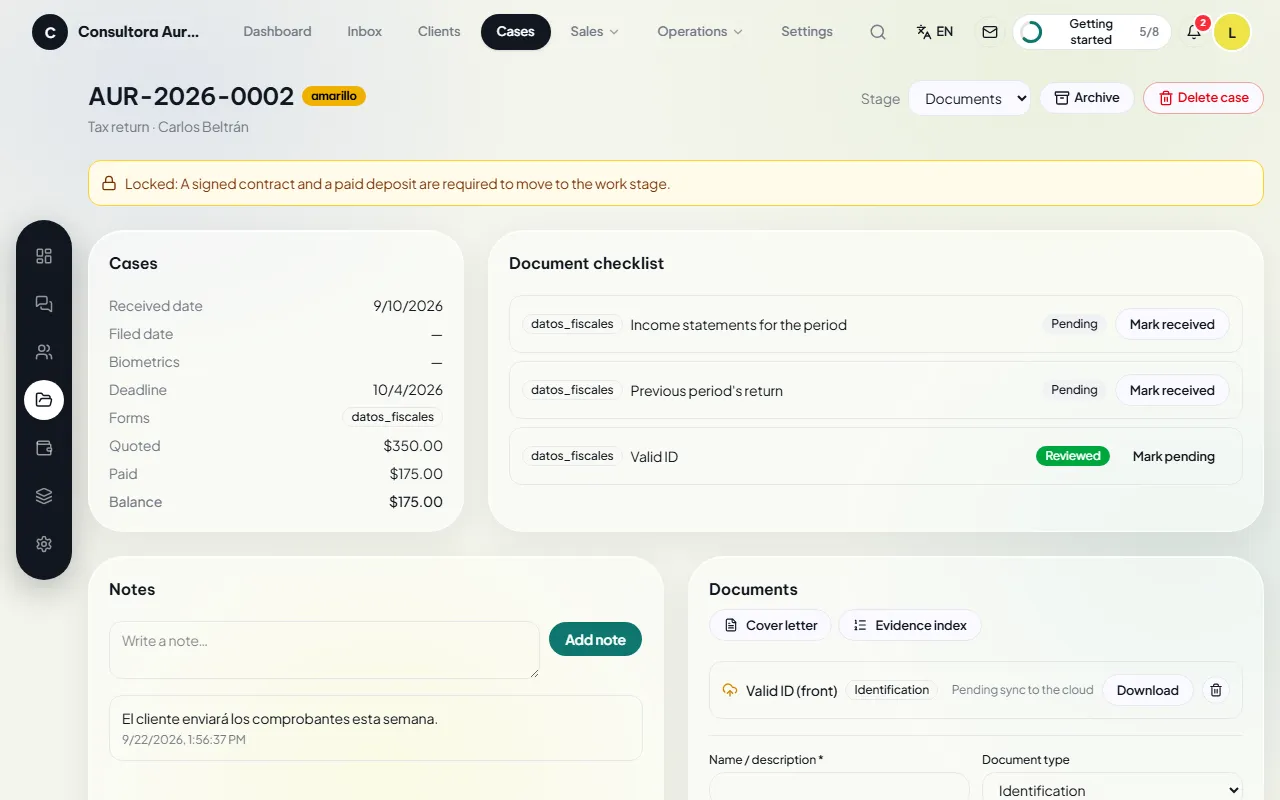
A case cannot move to the work stage until the contract is signed and the deposit is paid. The rule is enforced in the database: neither the interface nor the API can skip it. Each company decides whether to require the contract, the deposit, both or neither.

Cases · Locked case
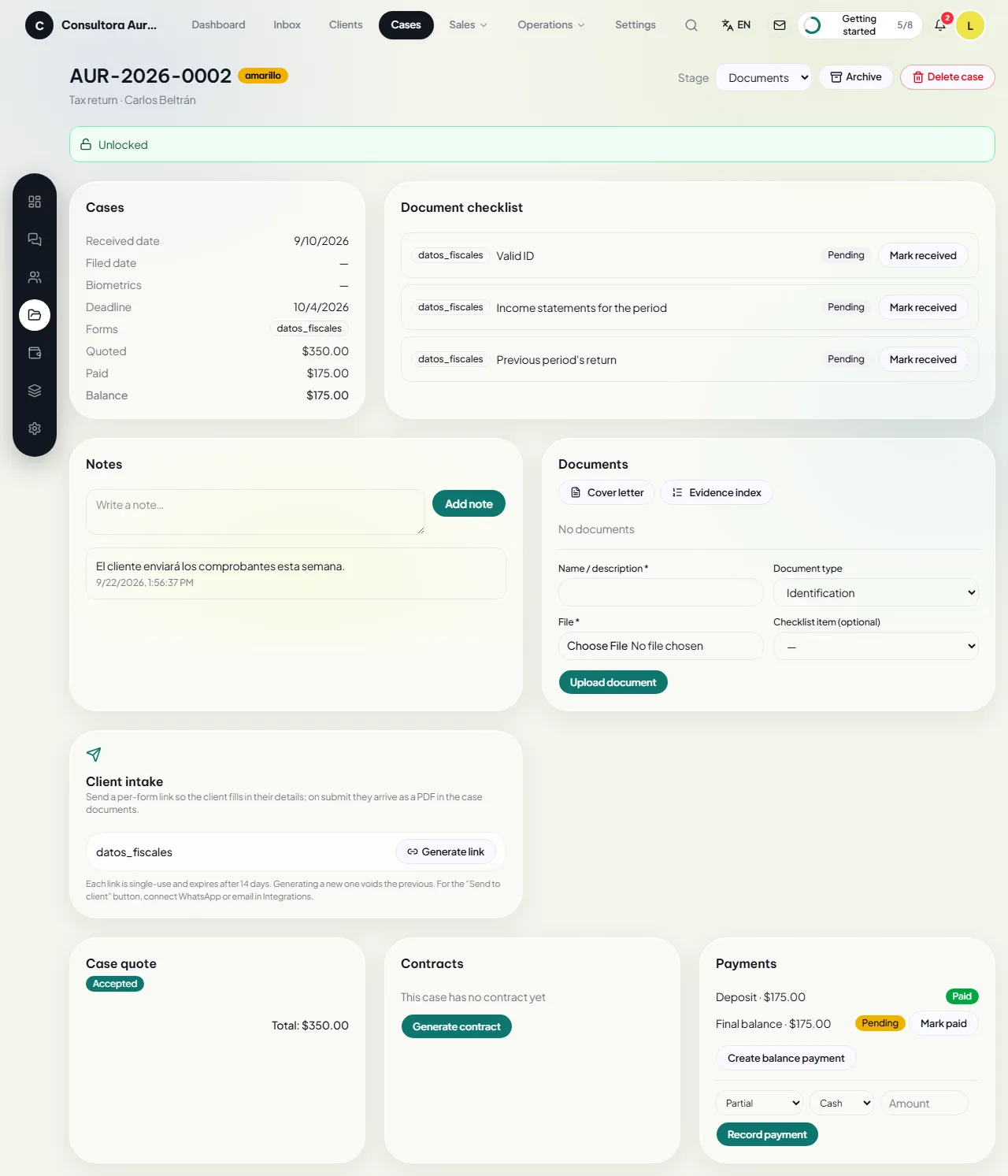
A locked case file: the CRM states that a signed contract and a paid deposit are required before moving to the work stage

The whole business in one place

Seven modules, named exactly as you will see them on screen, each with a real screenshot.

Dashboard

Today’s numbers

Active cases, outstanding balance, upcoming deadlines, new leads, tasks and schedule, cases by stage and revenue by service and by month. The cases that need attention, sorted by priority.

  • Active cases, outstanding balance, upcoming deadlines and new leads from the last 30 days.
  • Pending tasks and the week’s schedule, each item one click away.
  • Cases by stage, leads by source, revenue by service and revenue by month.

Inbox

Every channel in one inbox

WhatsApp, Messenger, Instagram, Telegram, SMS and email land in the same inbox. The team replies, leaves internal notes and assigns an owner. An AI agent, running on the business’s own API key, gives the first reply if you switch it on.

  • Reply to the client, leave internal notes for the team, assign an owner, close or put on hold.
  • Quick replies and templates; saved views with each day’s filters.
  • Leads that arrive without a record: link them to a client or create one from the conversation.

Clients

The complete record

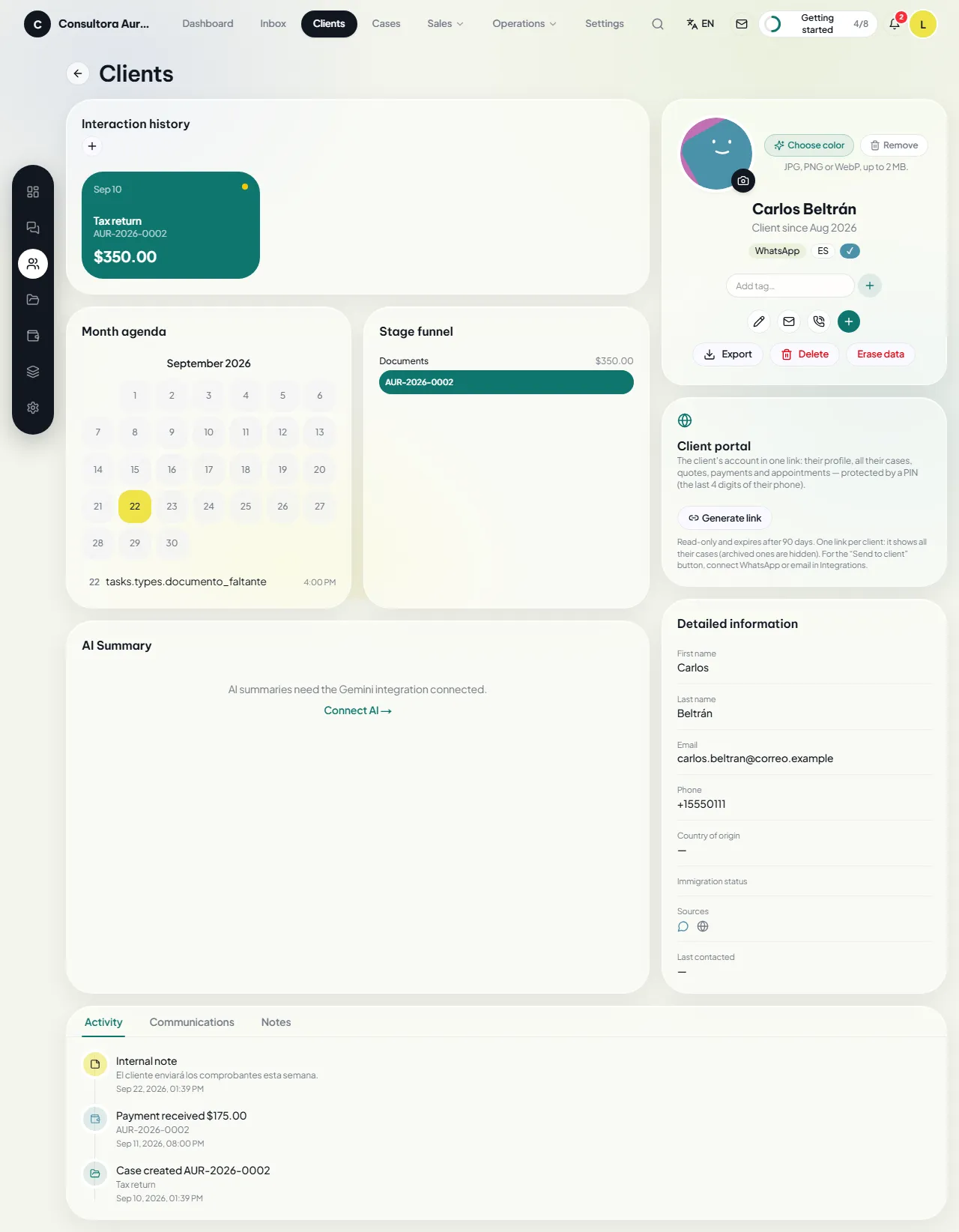
Details, cases, schedule, communications and notes for every client. CSV import, duplicate detection and merge, browser calls from the company’s own number, and a client portal with a secure link.

  • Manual entry or CSV import; export whenever you need it.
  • Duplicate detection and merge without losing cases, notes, communications or appointments.
  • Templated messages, browser calls from the company’s number, and a log of every call.

Cases

List, board and file

Deadline traffic light, priority, document checklist, case documents, intake by link and a board by stage. The contract-and-deposit lock, visible on every case.

  • A list with filters, deadline traffic light and priority; a board to move cases between stages.
  • A file with stage, checklist, uploaded and generated documents, and notes.
  • Intake by link: the client fills in the form and the answers are saved to the case as a PDF.

Sales

From quote to payment

Quotes built from the service catalog, contracts with your own PDF and e-signature, deposits and balances with Stripe payment links, per-company reports, WhatsApp and email campaigns, and Meta and Google Ads results.

  • A quote built from the service catalog; sent to the client, with their decision recorded.
  • A contract generated from the accepted quote, with your own clauses or the business’s own PDF; e-signature (DocuSign or Documenso), or a record of a signature obtained outside the system.
  • Deposit and balance with Stripe links and invoices, or payments recorded by any other means.

Operations

Documents, tasks, plans and calendar

Every file from every case on one screen and copied to the business’s cloud; tasks and reminders; follow-up plans that send messages automatically on the scheduled days; a calendar synced with Google Calendar or Outlook.

  • Documents: any file from any case on a single screen, with a marker showing whether it is already copied to the cloud.
  • Tasks: reminders generated by the CRM and follow-ups created by the team, grouped by owner.
  • Follow-up plans: sequences of messages and tasks the CRM sends automatically on the scheduled days, stopping when the client replies.

Pages for your clients

Portal, intake and public quote

The client opens a secure link to their portal: profile, cases, quotes, payments and appointments. They fill in their details on the intake form and accept the quote from their email.

  • Client portal with a secure link: profile, cases, quotes, payments and appointments.
  • Intake form: the client fills in their details and they are saved to the case as a PDF.
  • Public quote: the client accepts it from the link in their email.
Dashboard
Dashboard with indicators, pending tasks and the week’s schedule
Inbox
A WhatsApp conversation in the inbox, with the client’s context on the right
Clients
A client record with details, cases and activity
Cases
A case file with its stage, checklist and documents
Sales
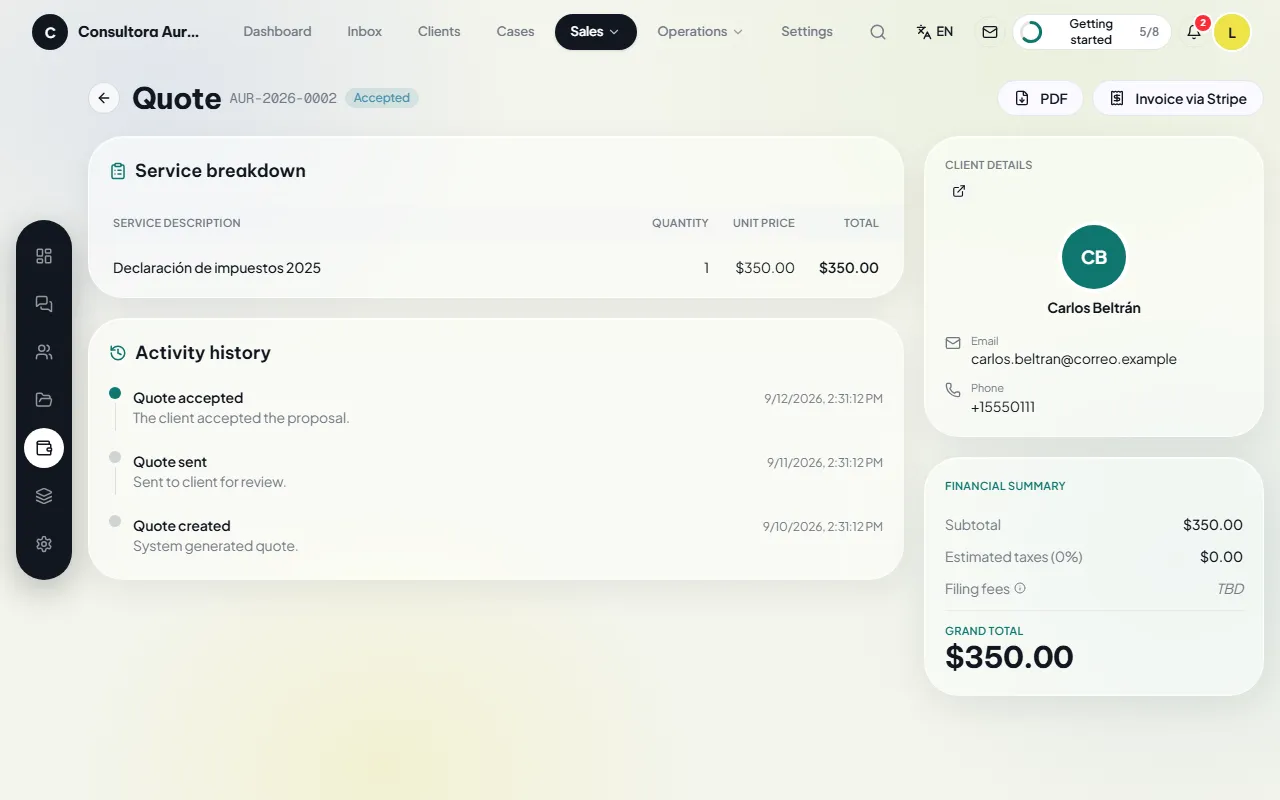
Quote detail with line items and sending status
Operations
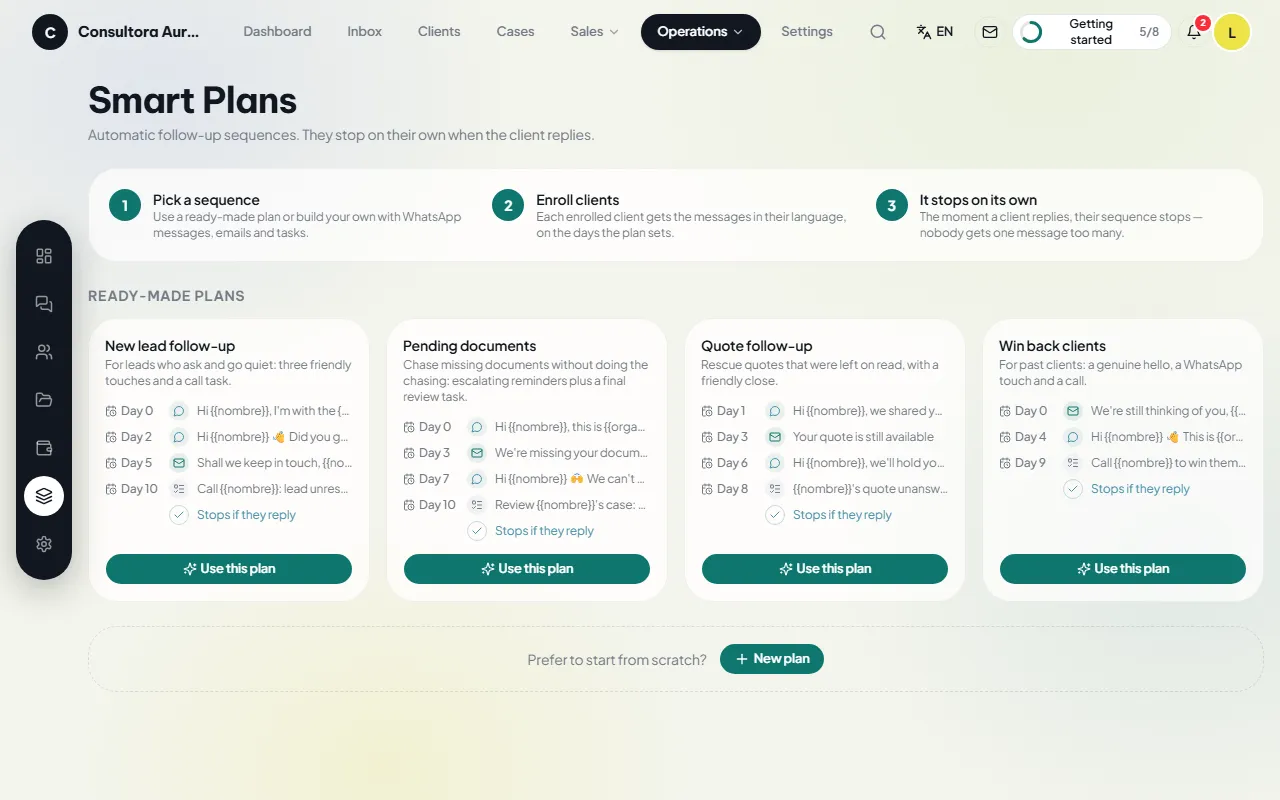
Pre-designed follow-up plans with their steps
Pages for your clients
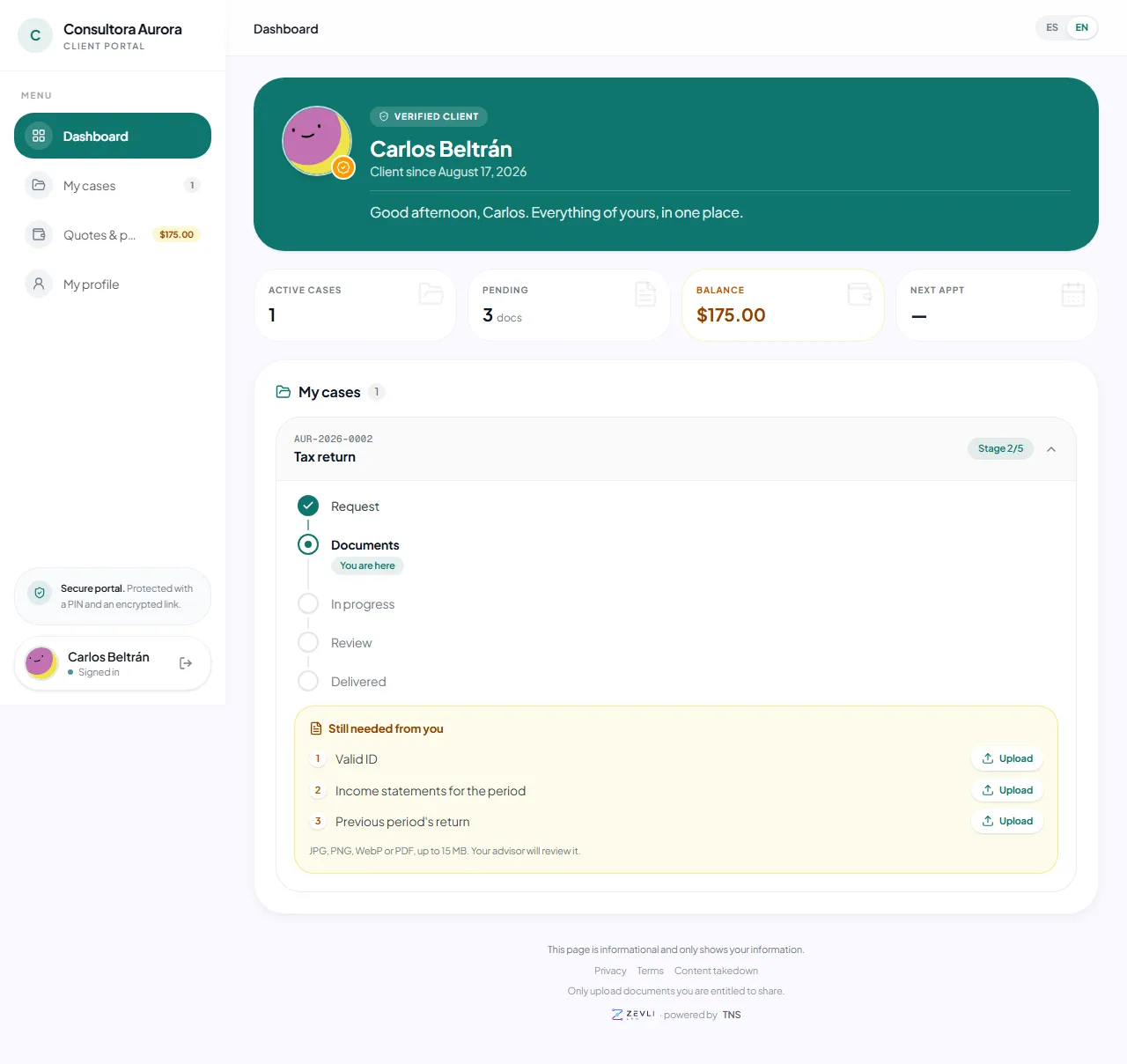
Client portal with cases, payments and appointments

Dashboard

Today’s numbers

Active cases, outstanding balance, upcoming deadlines, new leads, tasks and schedule, cases by stage and revenue by service and by month. The cases that need attention, sorted by priority.

  • Active cases, outstanding balance, upcoming deadlines and new leads from the last 30 days.
  • Pending tasks and the week’s schedule, each item one click away.
  • Cases by stage, leads by source, revenue by service and revenue by month.
Dashboard
Dashboard with indicators, pending tasks and the week’s schedule

Inbox

Every channel in one inbox

WhatsApp, Messenger, Instagram, Telegram, SMS and email land in the same inbox. The team replies, leaves internal notes and assigns an owner. An AI agent, running on the business’s own API key, gives the first reply if you switch it on.

  • Reply to the client, leave internal notes for the team, assign an owner, close or put on hold.
  • Quick replies and templates; saved views with each day’s filters.
  • Leads that arrive without a record: link them to a client or create one from the conversation.
Inbox
A WhatsApp conversation in the inbox, with the client’s context on the right

Clients

The complete record

Details, cases, schedule, communications and notes for every client. CSV import, duplicate detection and merge, browser calls from the company’s own number, and a client portal with a secure link.

  • Manual entry or CSV import; export whenever you need it.
  • Duplicate detection and merge without losing cases, notes, communications or appointments.
  • Templated messages, browser calls from the company’s number, and a log of every call.
Clients
A client record with details, cases and activity

Cases

List, board and file

Deadline traffic light, priority, document checklist, case documents, intake by link and a board by stage. The contract-and-deposit lock, visible on every case.

  • A list with filters, deadline traffic light and priority; a board to move cases between stages.
  • A file with stage, checklist, uploaded and generated documents, and notes.
  • Intake by link: the client fills in the form and the answers are saved to the case as a PDF.
Cases
A case file with its stage, checklist and documents

Sales

From quote to payment

Quotes built from the service catalog, contracts with your own PDF and e-signature, deposits and balances with Stripe payment links, per-company reports, WhatsApp and email campaigns, and Meta and Google Ads results.

  • A quote built from the service catalog; sent to the client, with their decision recorded.
  • A contract generated from the accepted quote, with your own clauses or the business’s own PDF; e-signature (DocuSign or Documenso), or a record of a signature obtained outside the system.
  • Deposit and balance with Stripe links and invoices, or payments recorded by any other means.
Sales
Quote detail with line items and sending status

Operations

Documents, tasks, plans and calendar

Every file from every case on one screen and copied to the business’s cloud; tasks and reminders; follow-up plans that send messages automatically on the scheduled days; a calendar synced with Google Calendar or Outlook.

  • Documents: any file from any case on a single screen, with a marker showing whether it is already copied to the cloud.
  • Tasks: reminders generated by the CRM and follow-ups created by the team, grouped by owner.
  • Follow-up plans: sequences of messages and tasks the CRM sends automatically on the scheduled days, stopping when the client replies.
Operations
Pre-designed follow-up plans with their steps

Pages for your clients

Portal, intake and public quote

The client opens a secure link to their portal: profile, cases, quotes, payments and appointments. They fill in their details on the intake form and accept the quote from their email.

  • Client portal with a secure link: profile, cases, quotes, payments and appointments.
  • Intake form: the client fills in their details and they are saved to the case as a PDF.
  • Public quote: the client accepts it from the link in their email.
Pages for your clients
Client portal with cases, payments and appointments

Your own accounts, connected in one click

Meta, Google, Microsoft 365, Stripe, DocuSign and Twilio connect by signing in with the business account: with no IDs or keys to copy and no technical setup. Every other provider connects with your own API key, encrypted on your equipment.

See all integrations

  • Meta
  • Google Ads
  • Google
  • Microsoft 365
  • Stripe
  • DocuSign
  • Documenso
  • WhatsApp Business
  • Messenger
  • Instagram
  • Twilio
  • Telegram
  • ManyChat
  • Resend
  • Google Gemini
  • OpenAI
  • Claude
  • DeepSeek
  • Kimi
  • OpenRouter

Pricing

One-time payment. The equipment is part of every purchase as a setup charge; the first year of maintenance and service is included.

Basic

For a small business that wants to keep clients, cases, quotes, contracts and payments in order.

999 USD · one-time

+ 499 USD setup

Buy in the store
  • Included: Up to 3 users
  • Not included: AI agent
  • Included: Preinstalled equipment included
  • Included: Perpetual license
  • Included: First year of maintenance and service

Unlimited

For businesses with more staff or several locations, with no user limit.

1,999 USD · one-time

+ 499 USD setup

Buy in the store
  • Included: Unlimited users
  • Included: AI agent
  • Included: Preinstalled equipment included
  • Included: Perpetual license
  • Included: First year of maintenance and service

Pricing details and terms

How to buy

  1. Buy in the store

    Choose your plan in the Tele Network Solutions store. The equipment is part of the purchase.

  2. Receive the preinstalled equipment

    An x86 mini PC with Zevli and your database, ready to plug into your office network.

  3. Activate the license

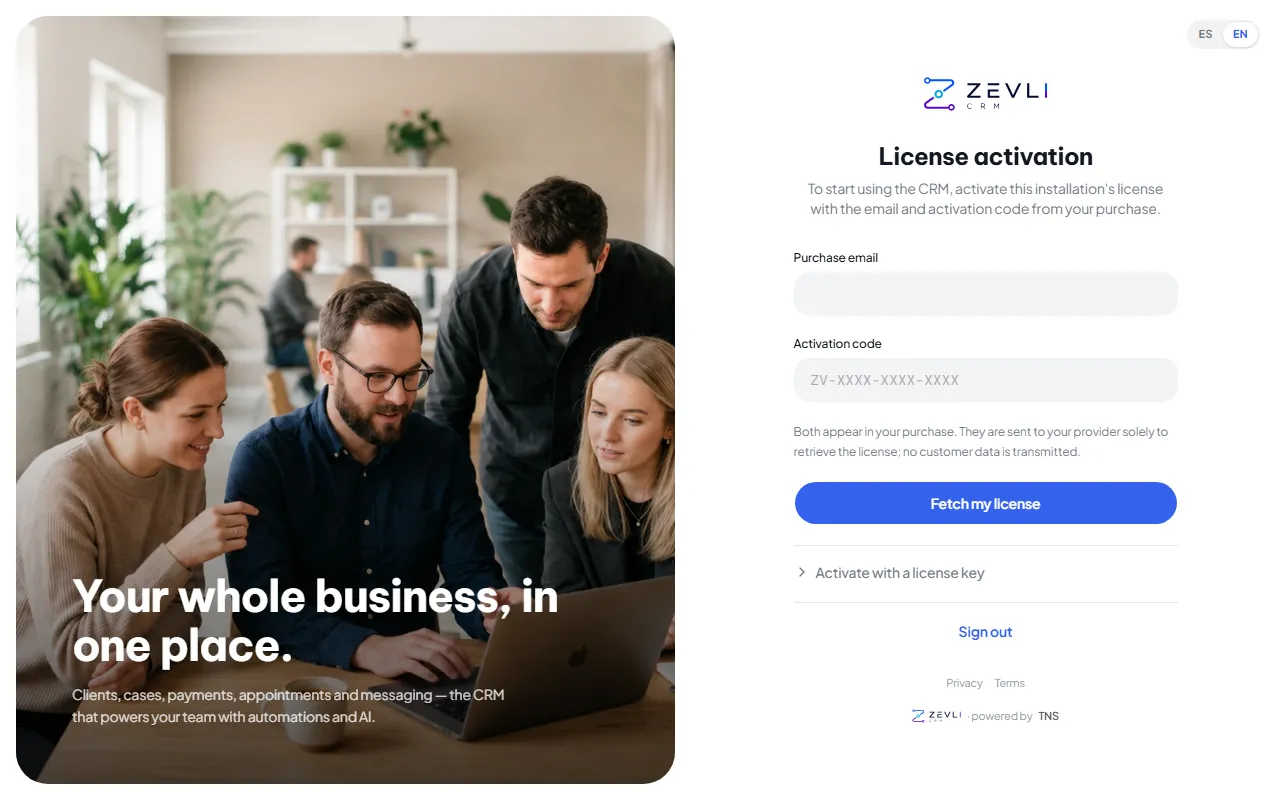
    With the purchase email and the activation code. A license key also works, offline.

  4. Connect your accounts

    WhatsApp, Google, Microsoft, Stripe and the rest, from Settings › Integrations, with “Connect”.

Settings · License activation
License activation screen with the purchase email and activation code fields

Your equipment, your data

Zevli is not a third party’s cloud service: it is an installation on equipment that belongs to you.

Security and data in detail

No vendor access
The database lives on your equipment. We have no access to your data or your clients’ data.
Isolation per company
Each company in the installation sees only its own records. The rule is enforced in the database and covered by a test suite.
Roles and permissions
Administrator, Operator and Assistant; the assistant never sees amounts. Permissions adjustable per role and per person.
Encryption and two-step verification
Integration credentials encrypted with AES-256-GCM, two-step verification for every user, verified webhooks and a strict CSP.
Immutable audit log
Who did what and when: every creation, edit and deletion is recorded, along with what changed.
Encrypted backups
A daily encrypted copy of the database and documents to your Google Drive or OneDrive. You keep the key; we never have it.

Frequently asked questions

All frequently asked questions

What does “buy once” mean?
You pay for a perpetual license and the equipment; there are no monthly fees. Maintenance and service (updates, fixes, support and the channels that run through Zevli Connect) is included the first year and costs 475 USD per year from the second. If you do not renew it, the CRM keeps working on your equipment.
What is the equipment?
An x86 mini PC that arrives preinstalled with Zevli and your database. It plugs into your office network, and you use the CRM from a browser on any computer or phone; on the local network it keeps working even if the internet goes down. It carries a 12-month warranty.
Does it fit my industry?
Zevli started in an office handling immigration, taxes, certified translation, apostille, notary and credit repair work, and it is now offered to any service business. The service catalog, the stages of each case and the document checklists are configured for your activity; industry packages get you started.
Can I run several companies?
Yes. Each license covers one company; each additional company costs 350 USD (one-time) and has its own clients, cases, figures, staff and integrations, isolated from the others.
Who has access to my data?
You do. The database is on your equipment and we have no access. Connections to WhatsApp, Google, Microsoft and others go through Zevli Connect, which delivers the credentials to your equipment and does not keep them.
Which languages does it work in?
The whole application is in Spanish and English; each user picks their language, and automatic messages to each client go out in the client’s language.

A demo with cases from your industry

Request a demo or buy directly from the Tele Network Solutions store.