
Integrations
Each company connects its own accounts from Settings › Integrations. Credentials are stored encrypted on your equipment and never displayed.
One-click connection: Zevli Connect
Meta, Google Ads, Google, Microsoft 365, WhatsApp Cloud, Stripe, DocuSign and Twilio connect with no IDs or keys to enter: click “Connect”, sign in with the business account and grant permission. Those connections go through Zevli Connect, the Tele Network Solutions service that hosts one verified application per provider, shared by every installation.
Connect delivers signed credentials to your equipment and keeps no copy. Providers that only work with an API key (Telegram, Resend, ManyChat, Telnyx and the AI providers) connect by pasting the business’s key, which is stored encrypted on your equipment. One-click connections require active maintenance and service.
Advertising
-

Meta (Facebook and Instagram)
One click
Ads, Messenger and Instagram: spend, clicks and leads from your campaigns inside the CRM, and how many leads became clients.
-

Google Ads
One click
Spend, clicks and leads from Google Ads campaigns, with their conversion to clients.
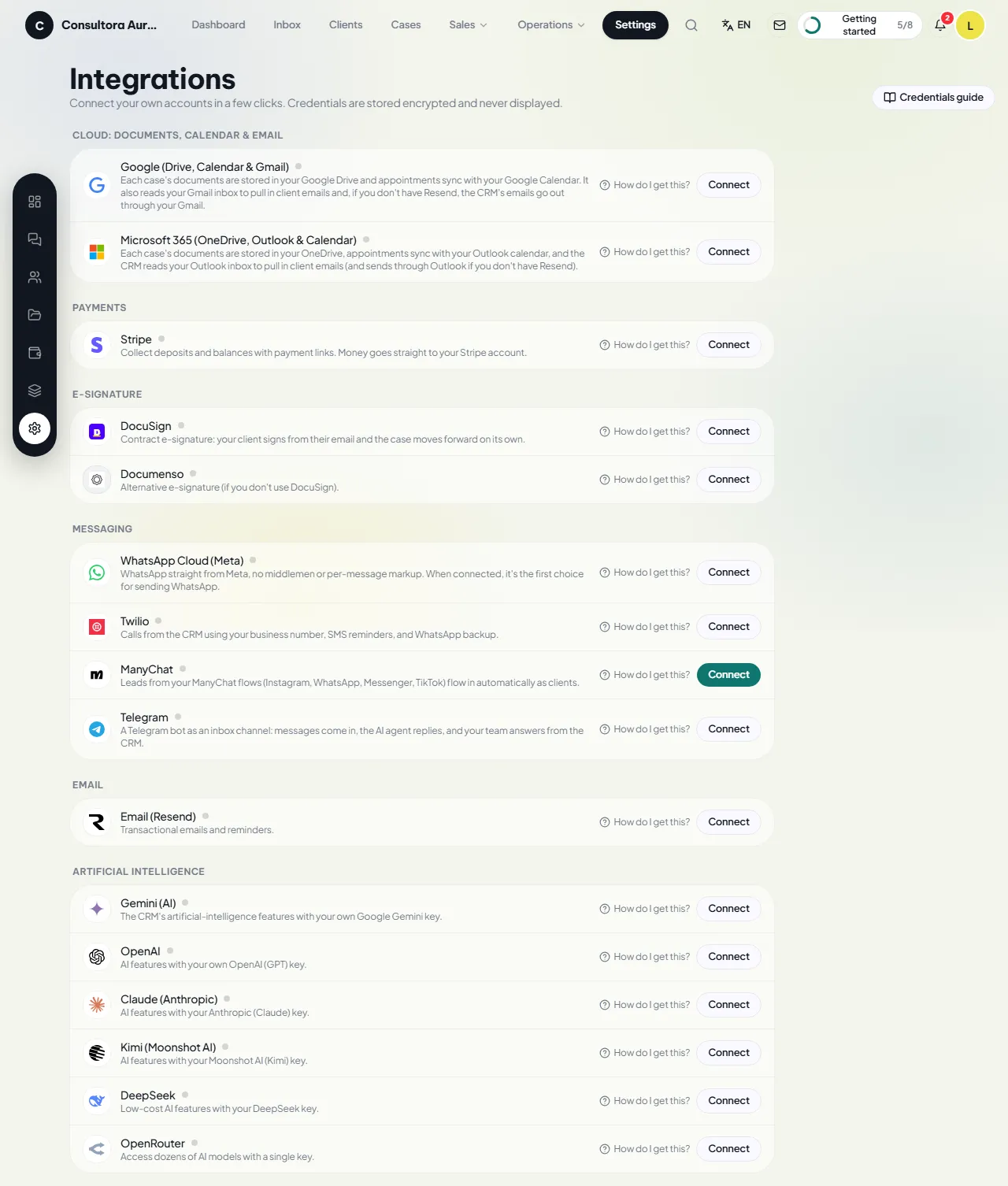
Cloud: documents, calendar and email
-

Google (Drive, Calendar and Gmail)
One click
Case documents are stored in your Google Drive, appointments sync with Google Calendar, and the CRM reads and sends email from your Gmail.
-

Microsoft 365 (OneDrive, Outlook and Calendar)
One click
Documents in OneDrive, appointments in the Outlook calendar and client email from your Outlook inbox.
Payments
-

Stripe
One click
Deposits and balances with payment links and invoices. The money goes straight to your Stripe account.
E-signature
-

DocuSign
One click
Contract e-signature: your client signs from their email and the case moves forward automatically.
-

Documenso
Your own key
Alternative e-signature if you do not use DocuSign.
Messaging
-

WhatsApp Business (Meta)
One click
WhatsApp directly with Meta, with no intermediaries and no per-message markup. Register your number from inside the CRM.
-

Messenger
One click
Messages to your Facebook page land in the inbox.
-

Instagram
One click
Direct messages to your Instagram account land in the inbox.
-

Twilio
One click
Browser calls from your company’s number, SMS reminders, and WhatsApp as an alternative route to Meta.
- Te
Telnyx
Your own key
An alternative to Twilio for SMS, WhatsApp and browser calling.
-

Telegram
Your own key
A Telegram bot as an inbox channel: messages land in the inbox, the team answers from the CRM and the AI agent can give the first reply.
-

ManyChat
Your own key
Leads from your ManyChat flows come in automatically as clients.
-

Resend
Your own key
Transactional email and reminders from your business’s verified sender.
Artificial intelligence
-

Google Gemini
Your own key
Intake agent, summaries and template generation with your own key.
-

OpenAI
Your own key
The same features with your OpenAI key.
-

Claude (Anthropic)
Your own key
The same features with your Anthropic key.
-

DeepSeek
Your own key
The same features with your DeepSeek key.
-

Kimi (Moonshot AI)
Your own key
The same features with your Moonshot AI key.
-

OpenRouter
Your own key
Access to dozens of models with a single key.
Several AI providers can be connected at once: the primary one answers and, if it fails, the CRM falls back to the others in order.
A demo with cases from your industry
Request a demo or buy directly from the Tele Network Solutions store.